

Reduce cost by scaling the monitoring with GTP load balancing in hardware

The Challenge due to increasing amount of Network Traffic
A report from Gartner states that communications service provider (CSP) network infrastructure is undergoing a radical transformation with the adoption of emerging technologies. Infrastructure and operations leaders must make crucial lifecycle decisions to drive this transformation forward and optimise costs and benefits to end users.
The challenge in today’s environment is the vast amount of growing data and the limited performance of existing probes. By deploying Cubro’s network performance monitoring and diagnostics (NPMD) technology to monitor network demand and manage capacity planning, the CSP can get the advantage of better functionality and advanced features. However, to cope with increasing network traffic, it is vital to look at the network architecture holistically and strike a cost-effective balance which does not compromise on high performance.
For the probe to deliver the expected output, the data session should always be on the same probe, even when the mobile device is moving across the network. The CSP has two options to manage unprecedented traffic load. One option is to use several probes to capture all the traffic. This can cost a massive amount of money. In addition to being a more expensive solution, it also requires the probes to be interconnected to share the captured information from different users and to get an overview of all data transferred in the network from the user equipment. One probe should know everything about a data session. If you look for a certain subscriber and experience of using the network; all sessions of this subscriber should be on the same probe. This requires the different probes in different locations to be connected to each other.
Another challenge is that a data session is typically open “forever” or for a very long time. As a result, typical approaches where the session is handled by TEID in the GTP protocol is not very useful because it needs a long time to acquire all TEID information. This is because this information is transferred only when a session is established or updated.
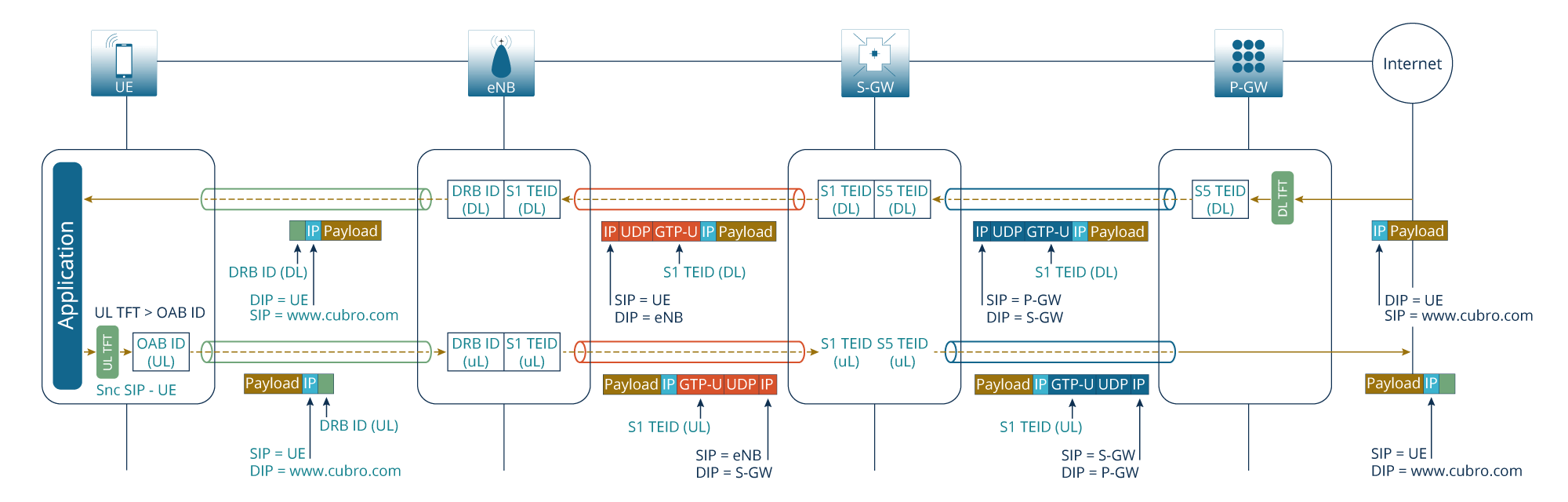
Additionally, the third big issue is, on LTE networks, the S5/S8 interface between S-GW and P-GW is not typically accessible because these two network elements are physical on the device. This means that only the S1U interface can be used. However, on the S1U interface, the TEID changes when the user moves to a different tower and it is nearly impossible to handle this. (See Figure 1)
It is a complicated matter because in order to follow the inter eNB handover, the full mobility management traffic (MME) must be analysed in real-time and this would be extremely expensive.
Cost-effective GTP Load Balancing Solution from Cubro
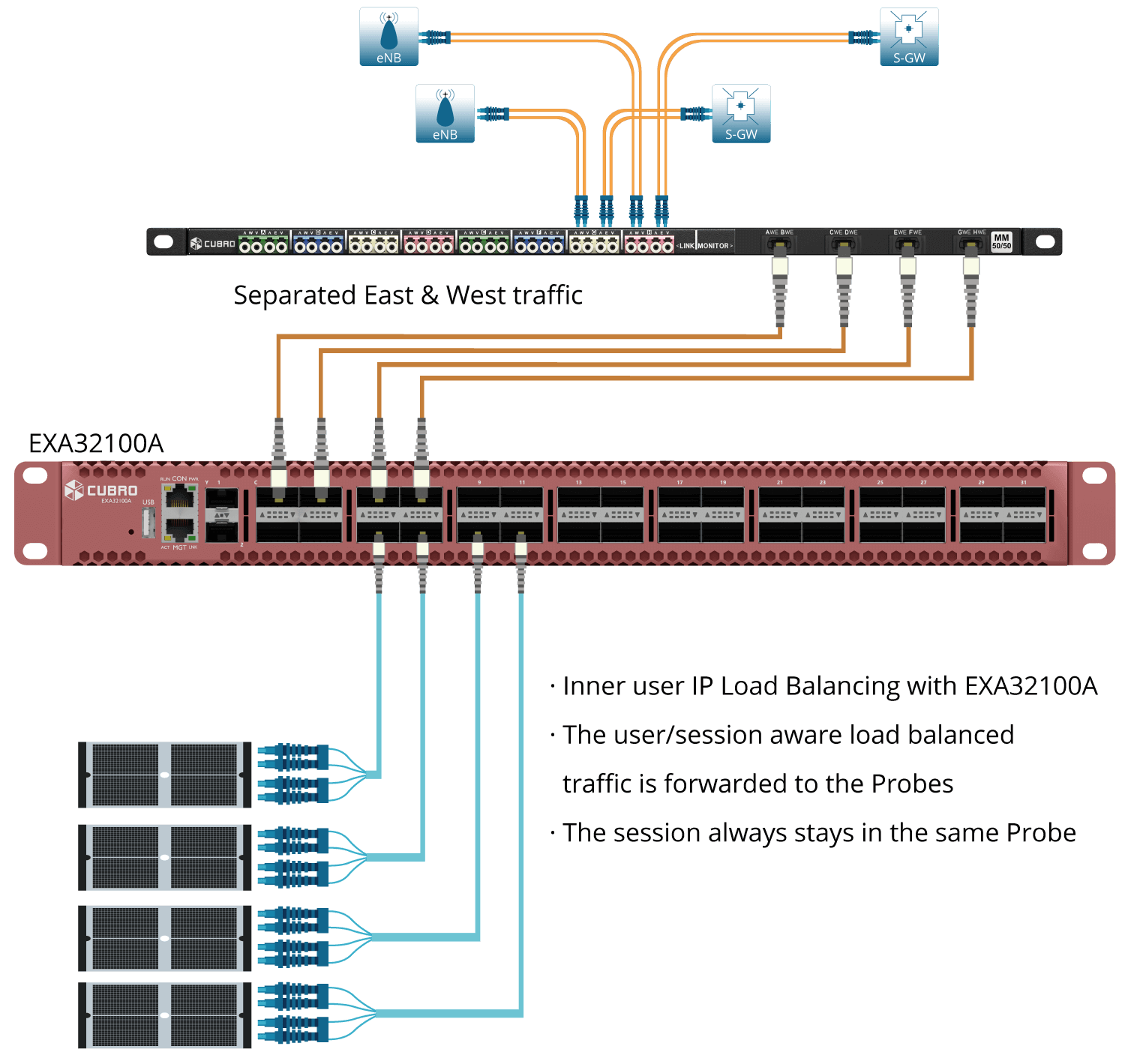
The Cubro solution is to load balance traffic based on the inner user IP. The Cubro Sessionmaster EXA32100A assures that all messages belonging to a specific session are correlated before forwarding them to the probe. Since this function is done in hardware, multiple 100 Gbit of traffic is possible with a single unit. This cost-effective solution load balances and filters traffic at full line rate before sending it to the probe, as a result, this increases the monitoring tool efficiency. Using Cubro’s solution, the organisation is able to reduce costs by scaling the monitoring system as traffic grows, boost performance of monitoring probes, and increase the utilisation of monitoring tools by preventing system overload.
Load Balancing
Avoid tool oversubscription. Scale your monitoring stack with Dynamic Egress Load Balancing
Load Balancing must be enabled on the Egress Port Group where traffic leaves the packet broker.
Within the Forwarding Policy configuration, navigate to the Egress port Group by clicking on the desired group. Inside the Egress Configuration, you can choose from three Egress Types. Choose Load Balancing, set it to Dynamic, and confirm it; no further configuration is required to forward your traffic.
Inner IP/Load Balancing
Balance your traffic based on what’s inside the payload
Load Balancing must be enabled on the Egress Port Group where traffic leaves the packet broker, plus Load Balancing Mode must be on Tunnel Inner Layer.
Within the Forwarding Policy configuration, navigate to the Ingress Port Group Settings by clicking on the desired group. Inside the Port Configuration menu, you can choose the Load Balancing Mode: Tunnel Outer or Inner Layer. We want to look at the Inner Layer. Next, navigate to the Egress port Group by clicking the desired group. Inside the Egress Configuration, you can choose from three Egress Types. Choose Load Balancing, set it to Dynamic, and confirm it; no further configuration is required to forward your traffic.
Products in this Solution

Additional resources


Our newsletter provides thought leadership content about the industry. It is concise and has interesting content to keep you updated with what’s new at Cubro and in the industry. You can unsubscribe anytime with a single click.
Your e-mail address is only used to send you our newsletter and information about the activities of Cubro Network Visibility. You can always use the unsubscribe link included in the newsletter.